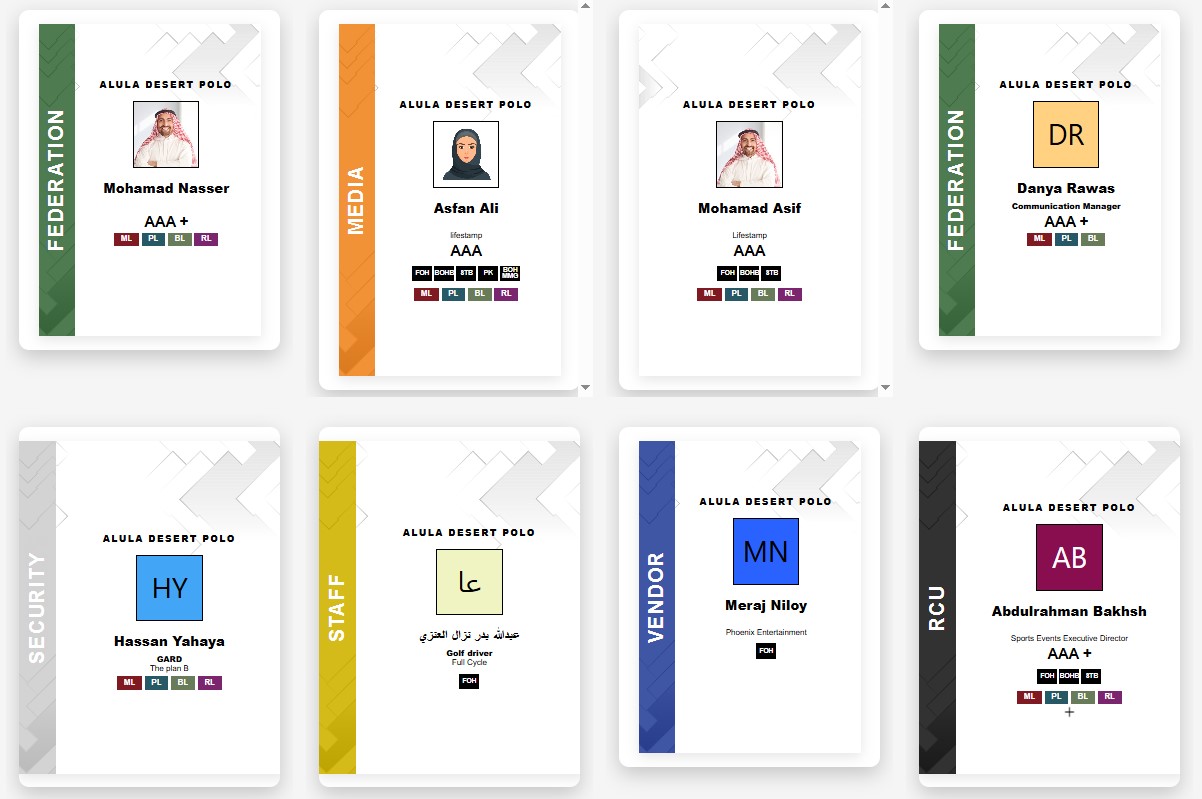
Pre-printing thousands of RFID badges before an event sounds logical — until you face 200 last-minute name changes, 15% no-shows whose badges you now need to void, and 50 walk-ins who were never in the system. On-site RFID badge printing solves all three problems simultaneously.
But on-site printing introduces its own complexity. Get the hardware wrong and your printers jam. Get the station layout wrong and you create queues at collection, not at registration. Get the credential flow wrong and your RFID gates fire before the badge is even encoded.
This guide walks through every layer of a production-grade on-site RFID badge printing setup — hardware, floor plan, credential flow, and the most common mistakes that cause day-of failures at Saudi Arabia events.
StampIQ On-Site RFID Printing — By the Numbers
45–60s
Per RFID Card
250+
Badges/Hr per Station
2 hrs
Setup Time On-Site
100%
Offline Capable
Why On-Site Printing Matters
The case for on-site RFID printing is straightforward: every change that happens after the pre-print deadline becomes a problem. Registration changes, attendee upgrades, category corrections, walk-in additions — with pre-printed badges, each exception requires a manual reprint and a voided card. At scale, this becomes unmanageable.
On-site printing eliminates the deadline. Attendees are printed when they arrive. The badge reflects the exact registration record at the moment of check-in — including any changes made up to that morning. Walk-ins join the same queue as pre-registered attendees and receive an identical credential in the same time.
Pre-Print Challenges
- Name change requests after print run — requires reprint
- No-shows leave unused RFID stock — wasted cost
- Walk-ins cannot get a personalised credential
- Badge category errors discovered at the door
- Sorting 5,000 pre-printed badges by surname — time intensive
On-Site Printing Advantages
- Badge printed fresh at check-in — always accurate
- Zero waste from no-shows — blank stock only
- Walk-ins processed in the same queue, same time
- Last-minute category changes take effect instantly
- No sorting — attendee name is printed on demand
For events in Saudi Arabia specifically: late registration confirmations are common, particularly for government and corporate events where approvals can arrive days before the event. On-site printing absorbs this variability without any operational disruption.
Hardware Requirements
A production-grade on-site RFID print station requires six hardware components working in concert. Missing or under-specifying any one of them creates the failure points that cause day-of incidents.
RFID Card Printer
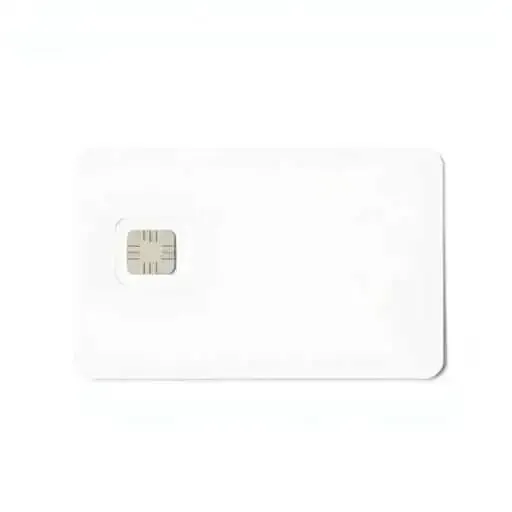
A dual-sided PVC card printer with integrated RFID encoder. Industry-standard models used by StampIQ operate at 200–300 cards per hour and support ISO 14443 (MIFARE Classic / DESFire) and ISO 15693 chip types.
Blank RFID PVC Cards
CR80-sized (86 × 54 mm) white PVC cards with pre-embedded RFID chips. Stock should be calculated at 110% of expected attendees to account for rejects, test prints, and walk-ins. Cards are stored in sealed cartridges to prevent dust contamination.
Print Station Tablet or PC
Each print station runs the StampIQ Credential Manager app — available on Windows 10+ and iPadOS 16+. The app connects to the local attendee database, handles attendee lookup via search or barcode scan, and sends print jobs directly to the attached printer.
Network Infrastructure
StampIQ recommends a dedicated Wi-Fi access point per 3 print stations. A wired Ethernet backbone is preferred for the central server. All print stations sync over the local network and maintain a local cache for offline operation when the internet drops.
ID Verification Scanner
For events requiring identity verification at check-in, a barcode or QR scanner is used to read the attendee's pre-registration QR code — reducing lookup time to under 2 seconds. StampIQ supports both handheld scanners and built-in tablet cameras.
Power & UPS Backup
Each print station requires 2 standard power sockets. StampIQ recommends one UPS (uninterruptible power supply) per 2 stations to protect against venue power fluctuations — a common issue in temporary event spaces across the GCC.
Hardware spec note: StampIQ ships pre-configured print kits to the venue — printers are loaded with the correct card stock, drivers are pre-installed, and the Credential Manager app is authenticated to your event. Setup at venue takes under 2 hours for a 5-station deployment.
Print Station Layout
Physical floor layout has a direct impact on throughput. A poorly arranged print station creates collisions between attendees arriving and collecting, forces staff to cross paths, and creates visual confusion that slows the check-in process. The optimal layout separates four functional zones in a linear flow.
Registration Desk
Attendees queue here first. Staff verify identity, confirm pre-registration, and handle walk-in data entry. One staff member per station.
Capacity: 1 operator per desk
Print Station Row
RFID printers are positioned directly behind the registration desk. After identity confirmation, the print job is sent and the badge arrives in 45–60 seconds. The attendee waits at the collection window.
Capacity: 1 printer per 250 attendees/hr
Lanyard & Accessories
Lanyards, badge holders, and accessories are pre-staged here. Staff attach the badge and hand off to the attendee in one motion — keeping the collection process under 30 seconds per person.
Capacity: 1 staff per 2 printers
First Access Gate
Immediately after collection, attendees pass through the first RFID reader gate, which verifies the newly printed badge and logs entry in the accreditation system. This gate is positioned 5–10 metres from the print station row.
Capacity: 1 gate per 2 print station pairs
Layout planning rule of thumb:
Allow a minimum of 3 linear metres per station pair (registration + printer). For a 5-station deployment serving 1,000 attendees per hour, you need approximately 15–18 metres of unobstructed floor space for the registration row, plus 4–5 metres depth for the printer and collection zones behind it.
Credential Flow Step-by-Step
From the moment an attendee joins the queue to the moment they pass through the first access gate, every step must be choreographed to maintain throughput. Here is the complete credential flow used by StampIQ at on-site deployments.
Attendee Arrives at Registration Desk
The attendee presents their pre-registration confirmation (QR code on phone or printed letter). Staff scan the QR code or search by name. The system retrieves the attendee record in under 2 seconds — including name, category, zone permissions, and badge template.
Identity Verification
For events requiring ID verification, staff confirm the attendee's government-issued ID matches the registration record. The system flags any discrepancies. Walk-in attendees are registered on the spot — data is entered, ID is recorded, and the badge is queued immediately.
Print Job Dispatched
With one click, the operator sends the print job to the designated printer. The StampIQ Credential Manager automatically selects the correct badge template based on the attendee category — no manual template selection required. The printer begins encoding the RFID chip and printing.
RFID Encoding & Printing
The printer first encodes the RFID chip with the attendee's unique credential ID and zone permissions. It then applies full-color printing to both sides of the card — name, organisation, category, photo (if enabled), event branding, and QR code backup. Total time: 45–60 seconds.
Badge Collection & Lanyard Attachment
The printed badge is ejected into the collection tray. A staff member at the accessories station attaches the lanyard and hands the badge to the attendee. Collection adds 15–20 seconds to the total process, bringing the full per-attendee time to approximately 90 seconds from scan to badge in hand.
First Gate Validation
The attendee holds their new badge to the RFID reader at the first access gate. The system verifies the credential, logs the timestamp, and grants access. The badge is now live in the StampIQ access control database — all subsequent zone gates will respond to it instantly.
Total per-attendee time breakdown:
~5s
QR scan & lookup
~15s
ID verification
45–60s
RFID print
~15s
Lanyard & collection
Common On-Site Setup Mistakes
Most day-of RFID printing failures are not caused by equipment malfunctions — they are caused by planning oversights that are entirely predictable. These are the six most common mistakes StampIQ sees when taking over an event from a previous vendor or handling a first-time on-site deployment.
Single Point of Failure on Printing
Running only one printer for 500+ expected attendees creates an immediate bottleneck the moment a jam or error occurs. Always deploy at least one spare printer per event, pre-configured and ready to activate in under 5 minutes.
Relying Solely on Venue Wi-Fi
Venue-provided Wi-Fi is shared across exhibitors, sponsors, media, and attendees. It is almost always saturated during peak registration. StampIQ deploys a dedicated private wireless network for print stations, completely isolated from the public venue network.
Underestimating Consumable Stock
A common error is ordering exactly the number of blank RFID cards as expected attendees. Account for test prints (5–10 per printer), failed encodes (1–2%), rejects due to scratches or handling, and walk-in registrations. Order at minimum 115% of your expected headcount.
No Pre-Event Printer Calibration
Printers shipped to venue must be recalibrated on arrival. Temperature and humidity changes during transport affect card feed alignment and color profiles. StampIQ technicians run a full calibration sequence — including 10 test prints per printer — before the event opens.
Insufficient Staff Per Station
Each print station needs at minimum one operator at the registration desk and one at the collection/lanyard station. Under-staffing creates a handoff bottleneck where the printer output rate exceeds staff capacity to process attendees. StampIQ provides trained staff with all deployments.
No Void & Reprint Workflow
Mistakes happen — wrong name, damaged card during handling, incorrect category. Without a documented void-and-reprint process, staff improvise inconsistently. StampIQ's system includes a one-click void function that immediately deactivates the original credential before issuing a replacement.
StampIQ On-Site Setup
StampIQ provides a fully managed on-site RFID badge printing service for events across Saudi Arabia and the GCC — powered by the digital badge generation service. The service includes hardware, consumables, software, technical staff, and a dedicated event support line — not a rental of equipment you operate yourself. Attendee data flows directly from StampIQ's self-registration portal into the on-site print queue, so badges are print-ready before the doors open.
Every StampIQ on-site deployment includes a pre-event database sync, ensuring all registered attendees are loaded on the local print station cache before the event opens. This means printing starts immediately at door-open, with zero reliance on live internet connectivity for standard operations.
What Every StampIQ On-Site Deployment Includes
- Pre-event database sync — all attendees loaded before the first guest arrives
- Offline-first printing — continues without internet during network outages
- Multi-template support — correct design auto-selected by attendee category
- Instant void & reprint — deactivates old credential, issues replacement in one step
- Live dashboard — track badge issuance, queue depth, and station throughput in real time
- Walk-in registration — capture data and print in the same workflow, no system switching
- Dedicated private network — isolated from venue Wi-Fi for guaranteed uptime
- RFID gate integration — printed badges are active at all gates the moment they are issued
Deployment timeline:
StampIQ teams arrive at the venue between 2–4 hours before door-open, depending on event scale. A 5-station deployment is fully operational in under 2 hours. Staff training for event volunteers takes 20 minutes per group. A full operational test — including test prints and gate verification — is completed before the first attendee arrives.
Frequently Asked Questions
Need RFID Badge Printing for Your Next Event?
StampIQ handles the complete on-site RFID badge printing setup — hardware, consumables, software, and trained staff — fully integrated with registration and access control. Operational in under 2 hours.
View Badge Printing Options